
Article
Trade show badge scanner apps compared (free and paid options for 2026)
Compare badge scanner and lead capture apps for 2026 trade shows — CRM integration, offline backup, and what to test before move-in day.

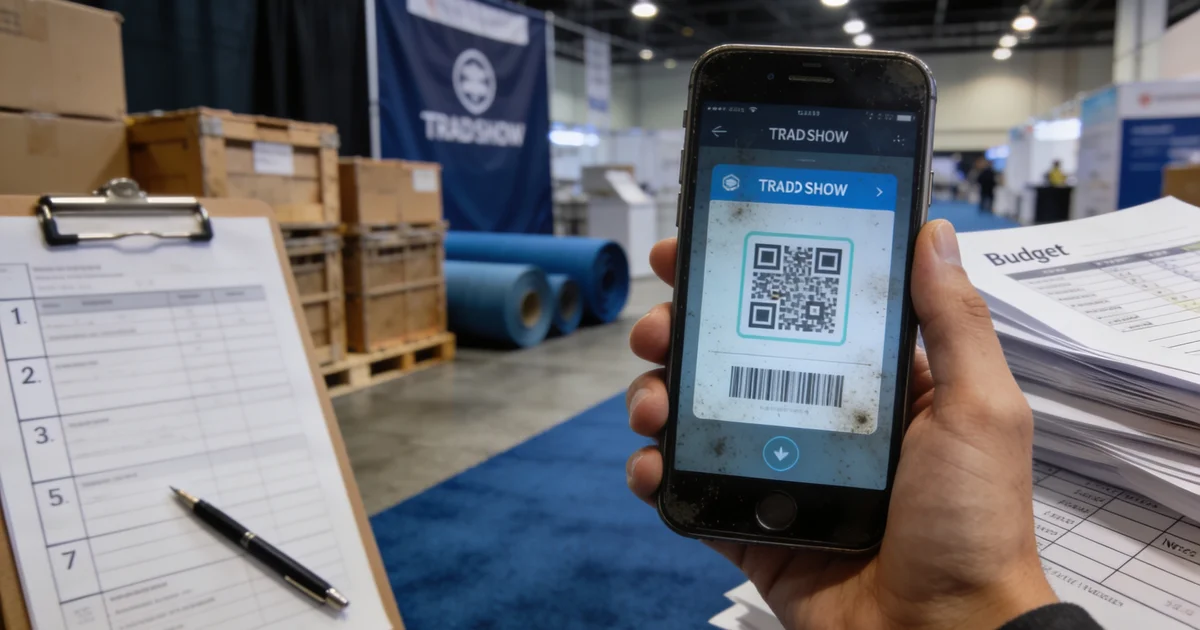
Article
Short answer: We group trade show badge scanner apps into five categories — show-organizer apps, CRM-native mobile, standalone lead retrieval, camera/OCR tools, and manual backup — then pick based on CRM integration depth, offline export, and whether a free tier survives a real show-floor test.
I've watched teams lose a day of pipeline because they assumed the app store star rating meant "works at McCormick Place on opening morning." It doesn't. Before you compare vendors, compare categories — each solves a different failure mode.
Five badge scanner app categories (not a fake review list)
We do not rank individual apps with invented scores. Instead, we map what exhibitors actually deploy on the floor:
| Category | Typical free tier? | CRM sync | Offline backup | Best for |
|---|---|---|---|---|
| Show-organizer lead retrieval | Often included in booth package | Export CSV; limited custom fields | Varies by show | Single-show exhibitors on a tight budget |
| CRM-native mobile (HubSpot, Salesforce, Zoho) | Included with CRM seats | Native — fields map to pipeline | Usually queues sync when back online | Teams already living in one CRM |
| Standalone lead retrieval | Limited scans or trial | API or Zapier; verify field mapping | Most support offline queue | Multi-show teams needing custom qualification |
| Camera / OCR badge readers | Freemium common | Weak — often email-only export | Depends on app | Backup device, not primary capture |
| Manual backup (paper + photo + CRM) | Free | Manual same-day entry | Always works | Every booth, regardless of primary app |
CRM integration: what to verify before move-in
Free badge scanner apps often capture name and company — then dump a CSV your SDRs never upload. Before 2026 show season, we require these fields mapped before travel:
- ICP tier — hot / warm / cold (drives follow-up SLA)
- Pain and timeline — one line from the qualification script
- Next-step owner — named AE or SDR in CRM
- Show source tag — ties pipeline to event ROI later
CRM-native apps win when your sales team already works deals inside HubSpot or Salesforce. Standalone apps win when you exhibit at six regional shows with different organizer systems but one internal qualification model.
Offline backup: non-negotiable on every booth
Show Wi-Fi is shared, overloaded, and sometimes blocked by venue firewalls. We treat offline export as a pass/fail test, not a nice-to-have:
- Enable airplane mode on the scan device
- Scan three test badges (or QR codes from the show manual)
- Export or confirm sync queue — screenshot the success state
- Repeat on the backup phone assigned to each booth zone
When scanners fail — and they do — fall back to photo of badge + paper log + same-day CRM entry. That workflow is the spine of our lead capture mistakes guide; the app is just the front end.
Free vs paid: when to upgrade
A free trade show badge scanner app is enough when:
- You exhibit at one Tier B regional show this year
- Your team accepts nightly CSV upload to CRM
- Qualification is two fields, not six
Upgrade to paid or CRM-native when you run multiple Tier A booths, need real-time lead routing to AEs on the floor, or finance asks for cost-per-qualified-meeting by show source. Line-item the license in your hidden costs budget — not as a day-before surprise.
How we shortlist shows after fixing capture
Scanner choice follows show selection, not the other way around. Once capture is tested, browse upcoming fairs on ExhibitionsVoice or start with city guides like Chicago and Las Vegas to compare Tier A vs regional options.
Multi-device setup for larger booths
At 20×20 and above, we assign one primary scanner per aisle entry plus a shared backup tablet logged into the same CRM account. Reps tag scans with booth zone (left, center, right) so follow-up owners know who met whom. Dedupe rules matter when two reps scan the same buyer — configure merge logic in CRM before show day, not during teardown.
FAQ
What is the best free badge scanner for trade shows?
There is no universal winner — match category to your CRM and show count. Test the free tier offline 48 hours before move-in; if export fails in airplane mode, switch category before you fly.
Do I need a separate app for each trade show?
Not if you use CRM-native or standalone multi-show apps. Show-organizer apps are per-event — fine for one regional fair, painful for a six-show calendar.
Pre-show scanner test checklist (48 hours before move-in)
- Scan 10 test badges on show Wi-Fi and on airplane mode — confirm export path works offline
- Verify CRM field mapping: company, title, ICP tier, next-step owner, booth notes
- Assign one backup device per booth zone with the same app logged in
- Train staff on manual fallback: photo of badge + paper log + same-day CRM entry
- Confirm dedupe rules if multiple reps scan the same visitor
If any step fails, read our lead capture mistakes guide before you ship crates.
When a free badge scanner app is enough
Free tiers work for single-booth teams at one regional show when you only need name, company, and email export — and you accept manual CRM upload after each day. Upgrade when you exhibit at multiple Tier A shows per year, need real-time CRM sync, or require custom qualification fields that sales uses in pipeline reporting.
Common exhibitor questions
Are free trade show badge scanner apps reliable?
Free tiers are reliable for basic capture at one-off regional shows if you test offline export before move-in. They break down when you need custom CRM fields, multi-rep dedupe, or real-time sync — plan a paid tier or CRM-native app for Tier A fairs.
What happens when badge scanners fail on the show floor?
Wi-Fi congestion, dead batteries, and permission errors are common. Every booth should run a manual backup: photo of badge, paper log with timestamp, and same-day CRM entry. Never rely on scanner-only capture.
Which CRM integrations matter most for lead retrieval?
Map at minimum: company, contact name, title, ICP tier, pain point, timeline, and next-step owner. HubSpot and Salesforce mobile capture apps sync these fields natively; standalone apps need verified field mapping before show day.
Should I use the show organizer's lead retrieval app?
Use it when included in your exhibitor package and export is clean. Still run your own CRM sync test — organizer apps often lack custom qualification fields your sales team needs for follow-up tiers.
How much do paid lead capture apps cost per show?
Standalone lead retrieval typically runs $200–$800 per event per device license; CRM-native mobile is often included in your CRM seat count. Budget the app line in your all-in show cost model, not as an afterthought.
Editorial standards & corrections
This guide is maintained by the ExhibitionsVoice editorial team. We cross-check dates, venues, and organizer names against official sources before listing events. Spot an error? Use our contact form with the event URL and corrected details — every correction request is read by editorial.
Read more: About ExhibitionsVoice · FAQs · All exhibitor guides
Related articles
Oil and gas trade shows 2026: energy calendar and how to pick
Oil and gas trade shows for 2026 — ADIPEC, WETEX, and offshore energy fairs we score for NOC, IOC, and energy-tech exhibitors.

CPHI India 2026 exhibitor guide: Delhi pharma ingredients floor
CPHI India 2026 exhibitor guide for 23-25 November at IICC Yashobhoomi, New Delhi — API, CDMO, and packaging teams scoring South Asia's ingredients floor.

Fintech trade shows 2026: payments calendar and how to pick
Fintech and payments trade shows for 2026 — Money20/20 USA, Sibos, and how banks and vendors pick Tier A/B/C money-ecosystem floors.
ADIPEC 2026 exhibitor guide: Abu Dhabi energy floor
ADIPEC 2026 exhibitor guide for 2-5 November at ADNEC Centre Abu Dhabi — who should exhibit, hall logistics, and how we score the energy floor.