
Article
How to qualify a trade show lead in under two minutes
A two-minute qualification script for busy aisles — role, timeline, budget authority, and CRM fields that turn badge scans into pipeline.
Article
Short answer: Qualify a trade show lead in under two minutes with four questions — role, timeline, authority or budget path, current vendor — then tag hot, warm, or cold in CRM before they leave your booth zone. One rep runs the script and scan; a second rep demos only warm and hot visitors.
When I audit post-show CRM exports after major B2B fairs, the gap is rarely the scanner app — it is the ninety seconds after the scan where nobody asked who can sign, when they need a solution, or what they use today. Marketing celebrates scan count; sales opens a spreadsheet of names with no context. This guide is the timed qualification workflow I require before any 2026 booth we advise on goes live: script, CRM fields, tier tags, polite redirects, and team rotation so demos do not eat the aisle.
Why two minutes is the right ceiling
Busy halls punish long conversations. A buyer who stops for thirty seconds will give you two minutes if the first question proves you are not wasting their time. Past two minutes without tier assignment, you are running an unpaid consulting session for someone who may never enter your pipeline.
Two minutes also forces discipline across the team. When every rep uses the same four questions in the same order, CRM data becomes comparable show to show — which is how you prove ROI to finance later via our trade show ROI scorecard. Random booth chat produces random exports; a script produces pipeline you can debrief.
Pair this workflow with show selection, not as an afterthought. If ICP density is weak on the floor, even a perfect script under- performs — shortlist candidates on ExhibitionsVoice before you print booth briefings.
The two-minute qualification script
Train every booth body on this sequence. Open with your 30-second booth pitch hook; the four questions below fill the remaining ninety seconds.
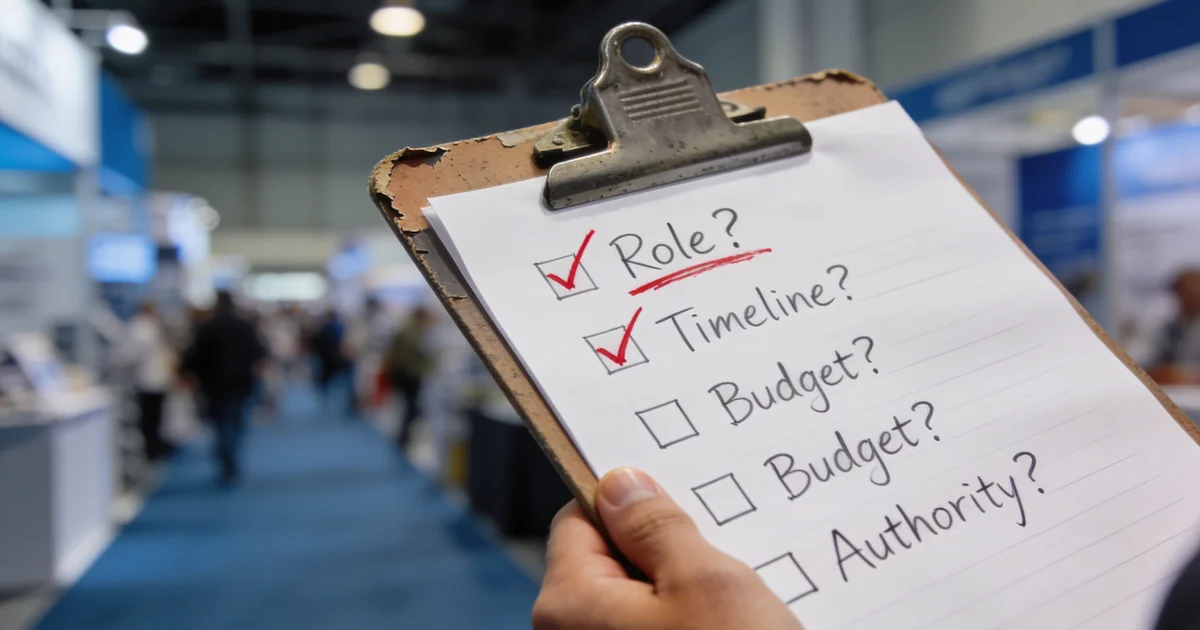
- Role — "What is your role, and what do you own day to day?" Filters students, job seekers, and adjacent titles in the first answer.
- Timeline — "Are you evaluating anything this quarter, or planning for next year?" Separates hot urgency from polite browsing.
- Authority / budget — "When you change vendors or approve spend, who else weighs in?" Surfaces economic buyers without asking "are you the decision-maker" bluntly.
- Current vendor — "What are you using today — and what would make you switch?" Gives follow-up line one and competitive context.
If answers point to ICP fit and a timeline under ninety days, assign hot and book the next step before they walk away. If pain is real but timing is vague, warm. If role or industry is off-profile, cold — see redirect below. Do not demo on question one; earn the demo with question four.
CRM required fields (non-negotiable before they leave)
Agree these fields with sales before travel — not in the hotel lobby. Map them in your scanner app or CRM mobile view the week before move-in.
| Field | Example capture | Why it matters |
|---|---|---|
| ICP tier | Hot / Warm / Cold | Sets follow-up SLA and email template tier |
| Role + authority | Director of Ops; signs under $250k | Stops SDRs chasing titles with no budget path |
| Timeline | Q3 RFP / evaluating in 2027 | Prioritizes same-week AE outreach |
| Current vendor | Competitor X; renews March | Personalizes subject lines post-show |
| Conversation hook | Asked about SAP integration | One line for hot email paragraph one |
| Next step | Demo Tue 2pm / send case study | Single CTA — no "we should connect sometime" |
| Next-step owner | Named AE or SDR | No orphan scans in shared inbox |
| Show source tag | [Show name] 2026 | Pipeline attribution at 90-day debrief |
Missing hooks are the top failure mode we flag in our lead capture mistakes guide. If the rep cannot write the hook sentence while the visitor is still in front of them, they will not write it Monday.
Hot, warm, cold — assign at the booth, not at debrief
Tier tags drive everything downstream: who sends email, how fast, and whether an AE or marketing nurture owns the record.
- Hot — ICP match, timeline under ninety days, budget path identified, explicit next step agreed (demo, specialist call, sample).
- Warm — ICP fit, pain validated, no immediate project — worth personalized follow-up within twenty-four hours.
- Cold — wrong persona, minimal conversation, or badge scan with no qualification answers — nurture or discard per your rules.
We tag tier at scan time on a shared phone or tablet. Hot leads also get a Slack or Teams ping to the named owner during show hours so same-day outreach happens before inboxes flood on Monday. Cold tiers should never receive hot email templates — that mismatch is how teams burn domain reputation after otherwise solid fairs.
Polite redirect for non-ICP visitors
Not every aisle stop is pipeline. Redirect without rudeness:
"Thanks for stopping by — we focus on [ICP segment]. Here is a public guide that might help your team. If your [role] colleague is walking the show, send them over — this demo is built for their workflow."
Offer swag or a one-pager if appropriate; do not run a fifteen-minute product tour for a clear non-buyer. Tag cold if you scan for house-list rules, or skip the scan entirely. Protecting rep time on day three is how you still have energy for hot conversations on day four — a pattern we tie to broader budget waste in our five biggest trade show mistakes piece.
Scanner plus notes workflow
The app captures identity; your script captures intent. We run this sequence on every qualified stop:
- Scan badge with primary device — CRM-native or standalone app tested offline per our badge scanner comparison.
- Dictate hook — qualifier speaks one sentence summary while partner selects tier and fills CRM fields.
- Confirm required fields on screen before visitor leaves the zone — glance at tablet together.
- Escalate hot — ping owner channel; AE steps in if demo queue allows.
- Backup if Wi-Fi fails — photo of badge, paper log, same-day manual CRM entry. Scanner-only capture fails on every busy hall eventually.
Notes within ten minutes beat perfect notes at midnight. Voice-to-text into CRM works when typing on a tablet is awkward — but a human must review before hot email sends.
Team rotation: one qualifies, one demos
Two roles, one booth — minimum on any pipeline-focused footprint:
- Qualifier (Rep A) — runs script, scans, tags tier, captures hook and next step. Does not launch into deep product unless tier is warm or hot.
- Demo (Rep B) — takes warm and hot visitors to screen or sample station after handoff. Stays visible so the aisle never looks empty.
Rotate every sixty to ninety minutes on peak days so one person is not stuck on cold traffic while the other hogs demos. At 20×20 and larger, add a third floater for scan backup and literature restock — but keep one named qualifier per zone so CRM notes stay consistent.
We brief this split in the pre-show huddle alongside scanner tests. If only one rep is on the floor, pipeline quality drops — that staffing gap is a planning mistake, not a skill gap.
Pre-show checklist (48 hours before doors)
- Script printed on badge clips or booth back wall — four questions visible at eye level
- CRM mobile view shows all required fields; tier picklist enforced
- Hot-lead Slack channel named with show tag and owner roster
- Qualifier and demo roles assigned per shift on a one-page grid
- Offline scan test completed on primary and backup phones
Run a ten-minute role-play at setup: one teammate plays a vague visitor, one plays a hot buyer — if the team cannot tag tier in under two minutes in rehearsal, they will not do it on the floor.
FAQ
How long should trade show lead qualification take?
Under two minutes for the four core questions. Demos and technical deep dives happen only after warm or hot tier assignment — not instead of qualification.
What is the best first question to qualify a booth lead?
Role and scope: "What do you own day to day?" It is conversational, filters non-buyers fast, and tells you whether to continue the script or redirect politely.
How do you qualify a lead without sounding like an interrogation?
Bridge from their answer to the next question — "That timeline helps — who else weighs in when you switch vendors?" — instead of firing four questions without context. The script is a conversation arc, not a checklist monotone.
Should every badge scan go into CRM as a lead?
No. Cold scans belong in nurture or discard per ICP rules. Finance and sales judge you on qualified meetings and pipeline influenced — not scan volume. Measure outcomes with the ROI scorecard, not the scanner counter.
How do you handle visitors who want a demo but fail qualification?
Offer a one-page overview or short video link, tag cold, and redirect. A demo for a non-buyer costs you a hot conversation you will never have — protect qualifier time on peak hours.
Can one person qualify and demo at a small booth?
Solo staffing works for Tier C validation booths with low traffic. For Tier A or B pipeline booths, run two trained reps minimum or accept that scan count will outrun qualified pipeline.
The two-minute qualification script (four questions)
- Role — "What is your role and what do you own day to day?"
- Timeline — "Are you evaluating anything this quarter or planning for next year?"
- Authority / budget — "Who else weighs in when you change vendors or approve spend?"
- Current vendor — "What are you using today — and what would make you switch?"
Pair with the 30-second booth pitch so the opener earns the next ninety seconds.
CRM required fields (capture before they leave the booth)
| Field | Example | Why it matters |
|---|---|---|
| ICP tier | Hot / Warm / Cold | Drives follow-up SLA and owner |
| Role + authority | VP Ops, signs under $250k | Filters pipeline from curiosity |
| Timeline | Q3 RFP / 2027 planning | Prioritizes same-week outreach |
| Current vendor | Competitor X, contract renews March | Personalizes follow-up line one |
| Conversation hook | Asked about integration with SAP | Email subject and demo agenda |
| Next step | Demo Tuesday / send case study | Single CTA per lead |
| Show source tag | [Show name] 2026 | ROI attribution at debrief |
Hot, warm, cold at the booth (assign before end of day)
- Hot — ICP match, timeline under 90 days, budget path clear, requested next step
- Warm — ICP fit, pain validated, no immediate project
- Cold — badge scan with minimal conversation or wrong persona
Tag in CRM at scan — not on the flight home. See lead capture mistakes for SLA handoff.
Scanner plus notes workflow
- Scan badge (or photo backup if Wi-Fi fails)
- Rep dictates one-line hook while partner tags tier
- Confirm required fields before visitor leaves zone
- Hot leads ping Slack channel for same-day owner
App choice: badge scanner comparison.
Team rotation: qualifier vs demo
Rep A qualifies (script + scan + tier). Rep B demos only when tier is warm or hot. Rotate hourly so no one burns out on small talk. Two-person minimum on any booth expecting pipeline.
Common exhibitor questions
How long should trade show lead qualification take?
Target under two minutes for the core four questions — role, timeline, authority or budget path, and current vendor. Longer demos happen only after a warm or hot tier is assigned.
What is the best question to qualify a trade show lead?
Start with role and scope — "What do you own day to day?" — before product pitch. It filters non-buyers in the first twenty seconds without sounding interrogative.
How do you politely redirect visitors who are not a fit?
Thank them, offer a public resource or swag, and point to a partner aisle if relevant. Do not run the full demo or add them to hot-tier CRM — tag cold and move on.
Should every badge scan become a CRM lead?
No. Cold scans belong in nurture or discard per your ICP rules. Finance cares about qualified meetings, not raw scan count — measure via our ROI scorecard.
How many booth staff do you need for qualification?
Minimum two trained reps on any pipeline booth: one qualifies and captures, one demos warm and hot visitors. Rotate roles hourly on busy aisles.
Editorial standards & corrections
This guide is maintained by the ExhibitionsVoice editorial team. We cross-check dates, venues, and organizer names against official sources before listing events. Spot an error? Use our contact form with the event URL and corrected details — every correction request is read by editorial.
Read more: About ExhibitionsVoice · FAQs · All exhibitor guides
Related articles
Oil and gas trade shows 2026: energy calendar and how to pick
Oil and gas trade shows for 2026 — ADIPEC, WETEX, and offshore energy fairs we score for NOC, IOC, and energy-tech exhibitors.
CPHI India 2026 exhibitor guide: Delhi pharma ingredients floor
CPHI India 2026 exhibitor guide for 23-25 November at IICC Yashobhoomi, New Delhi — API, CDMO, and packaging teams scoring South Asia's ingredients floor.

Fintech trade shows 2026: payments calendar and how to pick
Fintech and payments trade shows for 2026 — Money20/20 USA, Sibos, and how banks and vendors pick Tier A/B/C money-ecosystem floors.
ADIPEC 2026 exhibitor guide: Abu Dhabi energy floor
ADIPEC 2026 exhibitor guide for 2-5 November at ADNEC Centre Abu Dhabi — who should exhibit, hall logistics, and how we score the energy floor.